
How to Simplify Text on Any Website with Helperbird
Learn how to use Helperbird to simplify complex text into plain, easy-to-understand language. A complete guide to the Simplify feature.
Jump to the stepsOn this page
What is Simplify?
Simplify rewrites hard text into plainer language. The meaning stays the same, but the words are more common and the sentences are shorter. You choose how plain the rewrite should be with a reading level.
Simplify is a Pro feature. On the free plan the feature row shows a diamond Pro feature badge, and the Simplify button is greyed out and does nothing.
If you want the key points of a long passage rather than a rewrite, try Summarize instead.
Who is This For?
This feature is helpful for:
- People with reading difficulties or dyslexia
- English language learners who find complex text hard to understand
- Students reading academic or technical content above their reading level
- Seniors who prefer plain language
- Anyone who finds jargon-heavy websites confusing
- People with cognitive disabilities who benefit from simpler text
Step 1: Open Simplify
Click the Helperbird icon in your browser toolbar. Find Simplify in the feature list and click the open button beside it. If you have added it to your quick actions, it appears there as Simplify text.
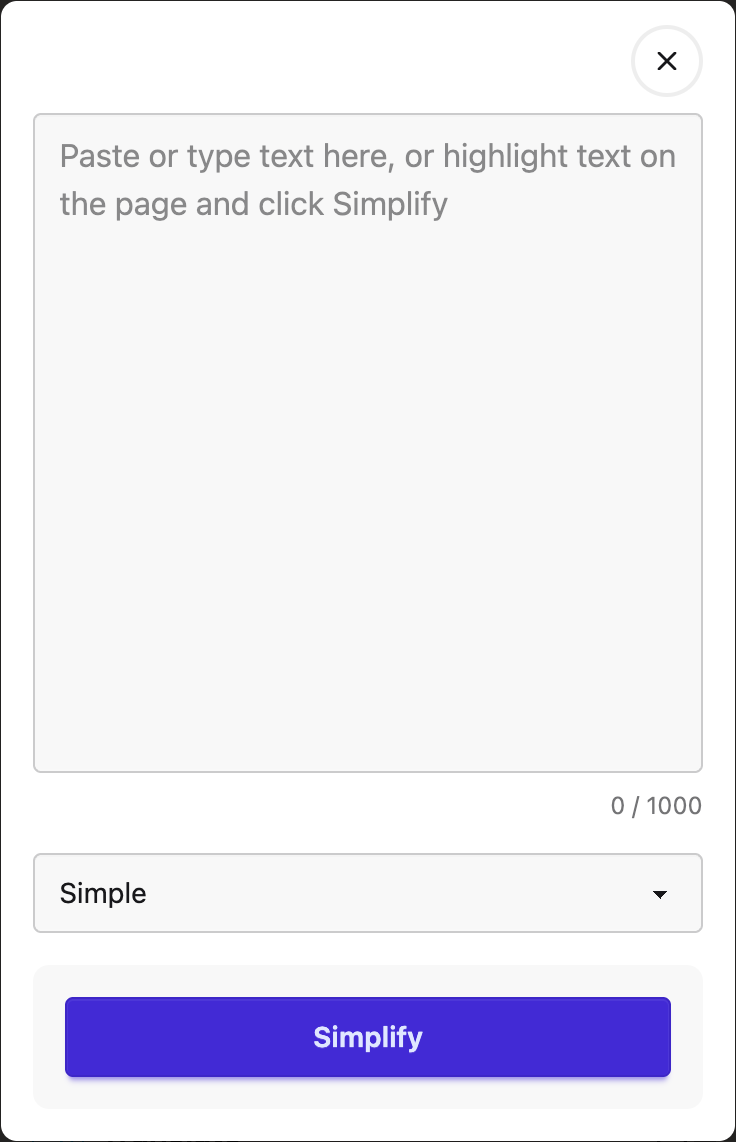
The Simplify window opens.
Step 2: Add Your Text
There are two ways to give Simplify text to work on.
Highlight text on the page. Before you open Helperbird, select the text you want with your mouse. Leave the box in the Simplify window empty.
Type or paste into the box. The Simplify window has a text box. Paste or type anything into it, even text from another app.
If the box has text in it, Helperbird uses that text and ignores anything highlighted on the page.
Two limits apply:
- The box holds up to 1,000 characters. A counter below the box shows how much you have used, and it turns red as you get close. A longer paste is cut off at 1,000 characters. There is no pop-up when that happens, so check the counter after a big paste.
- Simplify handles up to 250 words at a time, whether the text is typed or highlighted. Longer text shows a "Text too long" message that tells you how many words to remove.
Step 3: Pick a Reading Level
Use the Reading level menu near the bottom of the window. There are four levels:
- Simple
- Elementary
- Middle school
- High school
Simple is the plainest and is the default. Helperbird remembers your choice, so the next time you open Simplify your level is already set.
Step 4: Click Simplify
Click the Simplify button. Helperbird sends your text off and rewrites it at the level you picked. This takes a few seconds.
Step 5: Read the Result
The rewrite appears in the window on the Simplified tab. Your text is not changed on the page itself.
Click the Original tab to see your text exactly as you gave it. Switch between the two tabs as often as you like to compare them.
Listen, Start Over, and Copy
Three buttons sit under the result:
- Listen opens text to speech with your text loaded. Press Play to hear it.
- Start over clears the result and your text so you can begin again.
- Copy puts the text on your clipboard. You see "Copied" when it works.
Listen and Copy act on the tab you are viewing. If you are on the Original tab, they speak or copy your original text, not the rewrite.
Troubleshooting
"Select some text first." The box was empty and nothing was highlighted on the page. Add text one of the two ways above.
"Text too long. Remove X words." Your text is over the 250 word limit. The message tells you how many words to cut.
"Something went wrong. Please try again." The rewrite failed on our end. If you typed or pasted your text, it is kept in the box, so press Simplify again. If you highlighted text on the page, highlight it again first.
Your pasted text got shorter. Pastes are cut at 1,000 characters with no message. The counter under the box shows the cut-off.
Closing the window clears everything, including text you typed and the result. Use Copy first if you want to keep the rewrite.
Video Tutorial
 View full-size image (opens in a new tab)
Need Additional Help?
If you have any questions or run into any issues, please contact the Helperbird support team. You can reach us at Helperbird support. We are happy to help you get the most out of Helperbird.
Printed from the Helperbird Help Center · Updated September 22nd, 2026
Questions? We are happy to help — helperbird.com/support