
How to Use the Helperbird Add-on for Google Docs
Use Helperbird in Google Docs to translate selected text, listen aloud, change fonts and spacing, and check the whole document. Follow the illustrated guide.
On this page
Helperbird adds reading tools beside your Google Docs file. Select text, choose a tool, then close it to return to the sidebar.
The browser extension can also read selected Docs text and provide word prediction and voice typing. Its Google Docs notice has a More information button that separates tools available on the page from tools in the add-on. Use the add-on to change the document’s fonts, size, and spacing.
How to Add the Helperbird Add-on to Google Docs
- Open your file in Google Docs.
- Choose Extensions → Add-ons → Get add-ons.
- Search for Helperbird, choose Install, and follow the prompts.
Your school or workplace may need to approve the add-on. See the installation guide for help.
What the Docs Sidebar Gives You
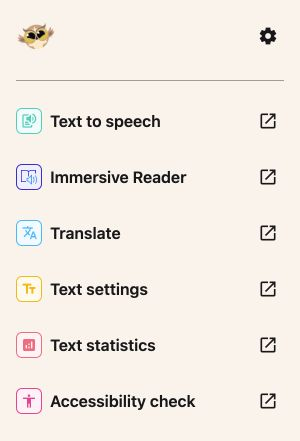
Choose a tool in the sidebar:
- Text to speech reads highlighted text, the current document tab, or text you type into its box.
- Immersive Reader offers read aloud, line focus, and reading preferences.
- Translate offers a preview or Translate & replace in one step.
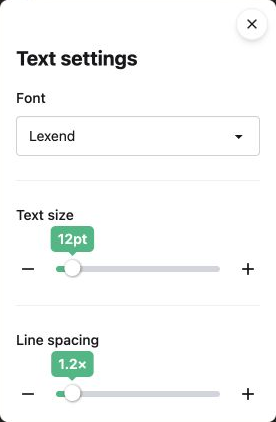
- Text settings combines fonts, text size, and line spacing.
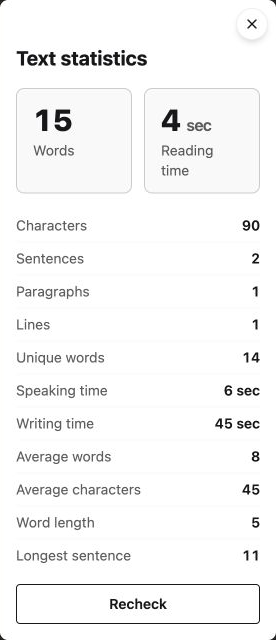
- Text statistics checks your selection on open and shows 14 statistics, including word count and estimated reading time. Use Recheck after changing your selection.
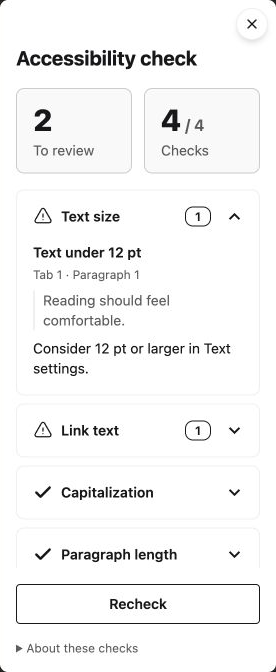
- Accessibility check checks the whole document on open, with Recheck and practical reading suggestions.
The gear button opens Settings, including your Pro connection and help links.
Alerts and confirmations appear briefly at the bottom of the sidebar. For example, if a tool needs selected text, a notification asks you to select it before trying again.
 View full-size image (opens in a new tab)
The Same Add-on in Slides and Sheets
Helperbird also has add-ons for Google Slides and Google Sheets. Slides works with selected text or text boxes. Sheets works with selected cells and has row height, column width, and text wrapping in Text settings.
How to Use the Translate Feature
Choose Extensions → Helperbird → Open Helperbird. Tools open in a modal, except Immersive Reader, which opens directly. Use its close button or press Escape to return to the tool list.
- Select text in your document.
- Open Translate in Helperbird.
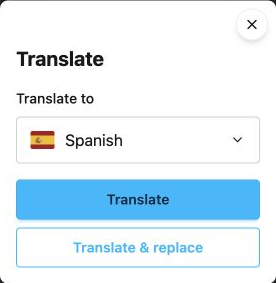
- Choose a language under Translate to. Use the arrow keys or type a language name to find it.
 View full-size image (opens in a new tab)
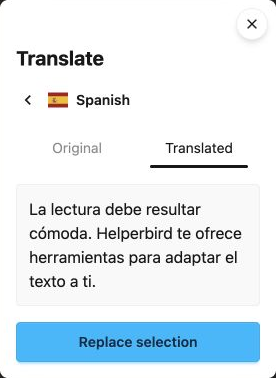
- Choose Translate. Switch between Original and Translated to compare the result.
- Choose Replace selection if you want to apply it.
- After Selection replaced appears, choose Done to close or Translate another to start again.
To apply a translation in one step, choose Translate & replace after choosing the language. Closing the modal before the translation is ready prevents the replacement from starting.
Replacement keeps the paragraph layout. Mixed formatting within translated text may change; review the result.
If the selection or its text changes after the preview, translate it again before replacing. A failed preview does not change your file.
 View full-size image (opens in a new tab)
How to Listen to Your Document
- Highlight text in your document, or leave nothing selected to read the current document tab.
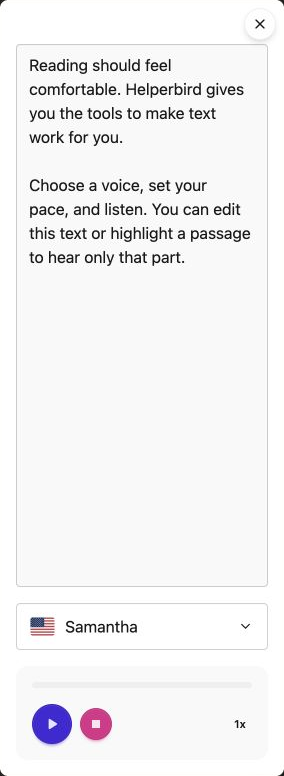
- Open Text to speech and choose a voice.
- Press Play. Helperbird loads the text into the box and reads it aloud.
- You can edit, delete, or paste text in the box. Highlight part of it to hear that passage, or leave nothing highlighted to hear the whole box.
Editing stops playback. Clearing the box leaves it empty; pressing Play again loads text from your file. You can pause, resume, stop, and change speed. Changes in the box do not change your document.
The voice list shows PNG flags and language names. Voices depend on your browser and device. Closing the modal stops playback.
 View full-size image (opens in a new tab)
How to Change the Font and Spacing
- Select the text you want to change.
- Open Text settings.
- Choose a Font, then adjust Text size and Line spacing.
Dyslexia and readability options are together in this modal. The font list includes Lexend, Lexend Deca, Atkinson Hyperlegible, Open Sans, Nunito, Arial, Verdana, Georgia, and more. Choose the font that feels easiest for you to read.
Changes apply only to selected text. If nothing is selected, select text before trying again.
 View full-size image (opens in a new tab)
How to Check Accessibility and Count Words
Open Accessibility check to review the whole document, including every tab, nested tabs, tables, headers, footers, and footnotes automatically. No selection is needed. The summary shows how many suggestions need review and how many checks completed. Expand a check to see its location, an excerpt, and a suggested change. After editing, choose Recheck to scan again.
The four checks cover:
- Text size: suggests larger text for small print.
- Link text: flags common vague English labels, such as “click here,” only when they are actual links. Long web addresses also get a suggestion.
- Capitalization: suggests sentence case for extended all-caps passages, while leaving short acronyms alone.
- Paragraph length: suggests breaking up passages over 150 words.
These reading suggestions cover four checks. They do not establish full accessibility compliance. If font or link details cannot be read, the result shows that the check is incomplete. Review contrast, image descriptions, and reading order separately. Checks do not edit your file.
 View full-size image (opens in a new tab)
Select text and open Text statistics. It checks automatically and shows words, characters, sentences, paragraphs, lines, unique words, reading/speaking/writing times, and sentence and word averages. Change your selection and choose Recheck to check again. Times are estimates.
Choose Immersive Reader in the sidebar to open your selected text directly. Exit the reader to return to the tool list.
 View full-size image (opens in a new tab)
Helperbird Pro in the Add-on
Open Settings using the gear button at the top of the sidebar. Enter your subscription key, then choose Connect.
The other sidebar tools work without a Pro key. Immersive Reader supports selections up to 1,200 characters on the free plan; Pro supports longer selections. Text to speech uses browser voices and does not use Helperbird's paid natural voices.
What the Docs Add-on Does Not Do
The add-on works inside Google Docs. Browser-page tools such as color overlays, the reading ruler, and auto-scroll belong to the Helperbird extension.
Text settings changes document formatting. It does not install local fonts. Translation works on the selected text; it does not translate every document tab at once.
Video Tutorial
The video shows an earlier sidebar layout. Use the steps above for the current tool names and modals.
Need Additional Help?
Contact Helperbird support if you need help. Include which Google app you use, the tool name, and what happened.
Printed from the Helperbird Help Center · Updated September 21st, 2026
Questions? We are happy to help — helperbird.com/support