
How to Change Fonts on Any Website
Learn how to change the font on any website using Helperbird. Choose from dyslexia-friendly fonts like OpenDyslexic, Lexend, and more to make reading easier.
Jump to the stepsOn this page
What is the Font Feature?
Helperbird lets you change the font on any website to one that is easier for you to read. This means you can replace hard-to-read fonts with clearer, more comfortable options like Lexend, OpenDyslexic, Atkinson Hyperlegible, or Comic Sans.
The font change applies to all the text on the page instantly, so you can see the difference right away.
Who is This For?
This feature is helpful for:
- People with dyslexia who find certain fonts easier to read
- Anyone who struggles with small, thin, or decorative fonts
- Students who want a consistent reading experience across different websites
- People with visual stress or eye strain
- Anyone who prefers a different font style
Step 1: Open Helperbird
Click the Helperbird icon in your browser toolbar. It looks like a small owl and is usually in the top-right corner of your browser.
This will open the Helperbird menu.
Step 2: Open the All Features Section
Scroll down to the bottom of the Helperbird menu. You will see a section called All Features.
Click the arrow next to All Features to expand it and show all available features.
Step 3: Find Text Settings
Look through the list of features until you see Text settings.
It has a yellow icon with the letter "T" on it.
Step 4: Open Text Settings
Click on Text settings to open it.
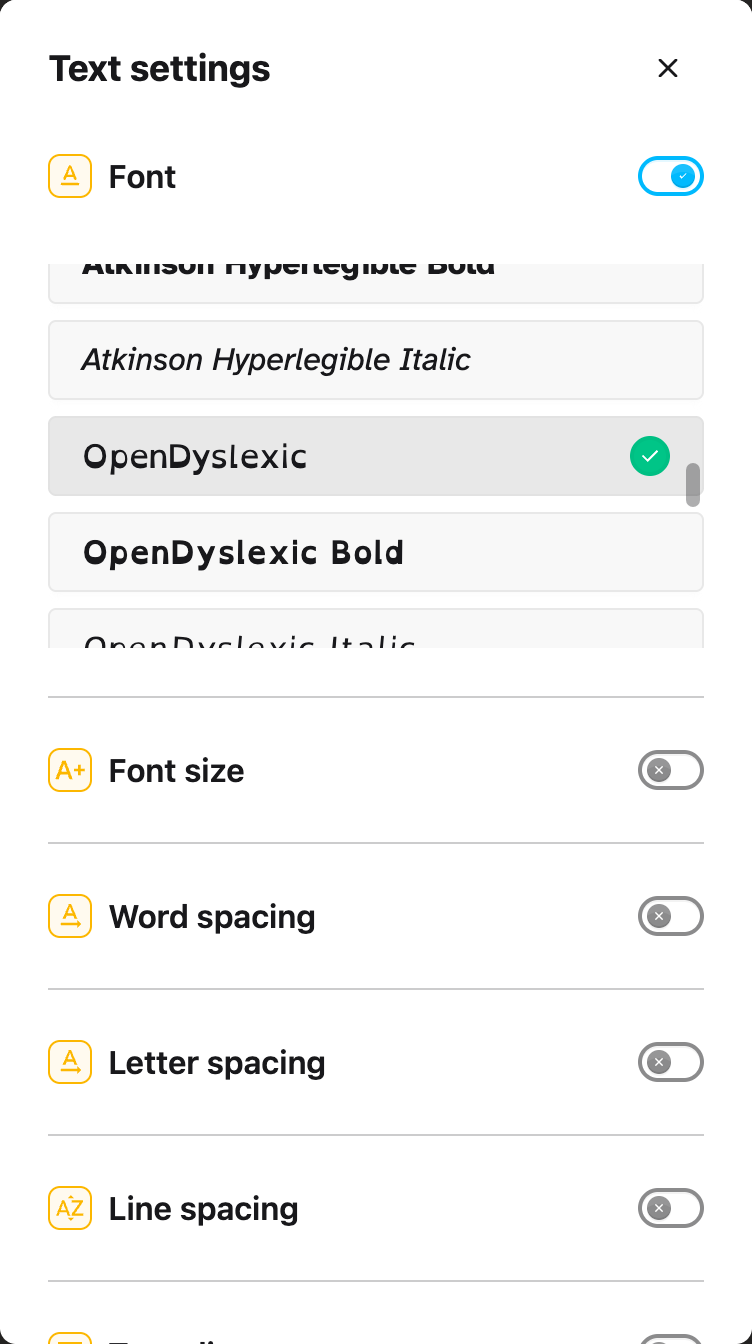
A panel will appear with all the text options in one scrollable list, with Font at the top. Scroll down to see the other text options.
Step 5: Turn on the Font Feature
At the top of the panel, you will see Font with a toggle switch next to it.
Click the toggle switch to turn it on. The toggle will turn blue when it is enabled.
 View full-size image (opens in a new tab)
Step 6: Choose Your Font
Once the Font feature is on, a list of fonts will appear below the toggle.
Click on any font name to select it. A green checkmark will appear next to the font you choose.
The font will apply to the website immediately. You can try different fonts to see which one you like best.
Available Fonts
Helperbird includes 32 fonts. Three of them, the Lora faces, are not available on iPad or iPhone, so you see 29 there.
The full list:
Standard Fonts:
- Arial - A clean, simple sans-serif font that is easy to read
- Comic Sans - A friendly, informal font that many people with dyslexia find easier to read
- Courier - A monospaced font where every letter takes the same width
- Georgia - A serif font designed for easy reading on screens
- Gothic - A clean, modern sans-serif font
- Helvetica - A classic, neutral sans-serif font
- Impact - A bold, heavy font for emphasis
- Palatino - An elegant serif font based on Renaissance designs
- Tahoma - A clear sans-serif font with good readability
- Times - A traditional serif font used in newspapers
- Trebuchet - A humanist sans-serif font with good legibility
- Verdana - A wide sans-serif font designed for screen reading
- Bookman - A traditional serif font with a friendly appearance
Dyslexia-Friendly Fonts (Lexend Family):
- Lexend Deca - Designed to reduce visual stress and improve reading fluency
- Lexend Exa - Wider letter spacing for easier word recognition
- Lexend Giga - Even wider spacing for maximum readability
- Lexend Mega - Extra-wide variant for those who need more space
- Lexend Peta - Extremely wide spacing between letters
- Lexend Zetta - The widest Lexend variant available
Dyslexia-Friendly Fonts (OpenDyslexic Family):
- OpenDyslexic - Weighted bottoms on letters help prevent them from rotating or flipping
- OpenDyslexic Bold - A bolder version for better visibility
- OpenDyslexic Italic - An italic version for emphasis
Accessibility Fonts (Andika Family):
- Andika - Designed for literacy learners, with letterforms chosen so similar characters cannot be confused
- Andika Bold - A heavier weight of the same design
- Andika Italic - The italic face
Accessibility Fonts (Atkinson Hyperlegible Family):
- Atkinson Hyperlegible - From the Braille Institute, designed for low vision. It pulls apart characters that usually look alike, such as capital I, lowercase l and the digit 1
- Atkinson Hyperlegible Bold - A heavier weight of the same design
- Atkinson Hyperlegible Italic - The italic face
Other Fonts:
- Coming Soon - A relaxed, handwriting-style font with a friendly feel
- Lora - A well-balanced serif font with moderate contrast. The three Lora faces are the ones not available on iPad or iPhone
- Lora Bold - A bolder version for headings or emphasis
- Lora Italic - An italic version for quotes or emphasis
Note: Some fonts (Lora, Lora Bold, Lora Italic) are not available on iPad.
Tip: If you have dyslexia, try OpenDyslexic or one of the Lexend fonts first. These fonts are specifically designed to reduce letter confusion and make reading less tiring.
Video Tutorial
Need Additional Help?
If you have any questions or run into any issues, please contact the Helperbird support team. You can reach us at Helperbird support. We are happy to help you get the most out of Helperbird.
Printed from the Helperbird Help Center · Updated September 22nd, 2026
Questions? We are happy to help — helperbird.com/support