Finish Words Before You Type Them
Start typing and word prediction suggests what comes next. Tap to accept, keep typing. Fewer keystrokes, fewer typos, faster writing.
Works in supported text fields, web forms, and Google Docs. Some custom editors and protected fields do not support insertion.
Learn how to use Word Prediction
Related features
- Voice Typing - Dictate text by speaking instead of typing for hands-free composing.
- Spelling & Grammar Checker - Fix spelling and grammar errors as you write across the web.
- Notepad - Draft and format documents in a distraction-free notepad built into your browser.
How It Works
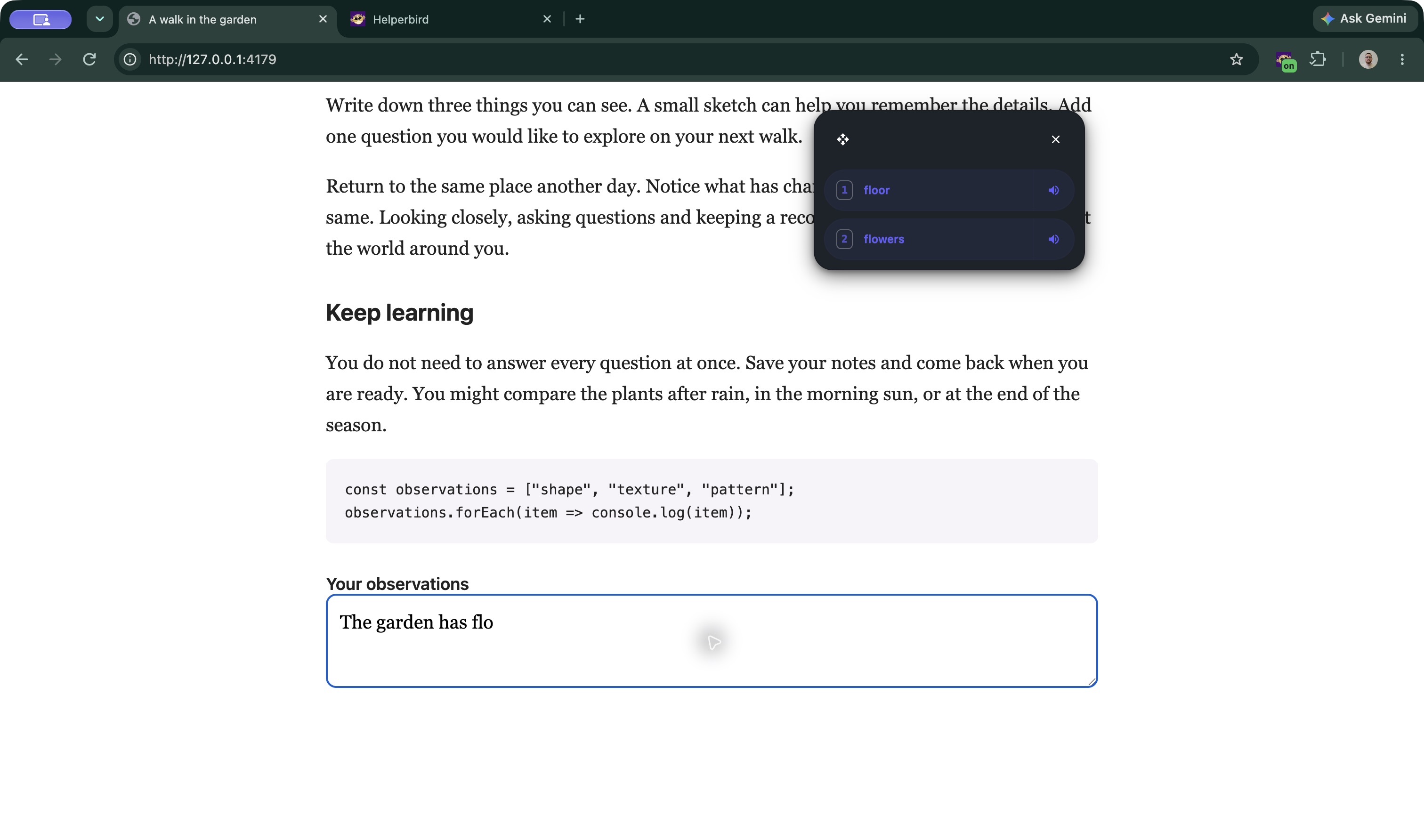
As you type, suggestions appear in a movable panel. Select one to insert it, or keep typing to ignore them.
Suggestions use the words around your cursor, not only the letters you have started typing. Recent improvements keep contextually ranked suggestions in order and improve recovery from typos, accents, and quoted words.
When learning is enabled, Helperbird can remember words and combinations you use. Changing the prediction language or topic does not require clearing your learned words. You can clear learned words and selection preferences in its settings.
Helperbird can detect and correct misspellings too. If you type a misspelled word and press space, corrections appear highlighted in the suggestion bar.
Choose Your Layout
In Word prediction settings, use Layout to choose Across for a horizontal row or Stacked for a vertical list. Move the panel using its drag handle. You can also change its size, theme and number of suggestions.
Learn how to change the layout
Supported Languages
- English
- French
- German
- Spanish
- Portuguese
Switch between languages as needed.
Who Uses This
People with dyslexia who benefit from spelling support while writing.
Slow typists who want to write faster.
Anyone with motor difficulties who wants to reduce keystrokes.
Language learners who need help with vocabulary.
Writers who want to speed up drafting.
Is This Free?
Word prediction is a Pro feature in Helperbird.